TABLE OF CONTENTS
Inspection Manager Information
Inspection Manager is an easy to use digital inspection report platform. It will allow you to easily create Entry and Exit Condition Reports and Routine Inspection Reports.
When you become an @realty Property Manager you are set up with an Inspection Manager account. Please contact the @realty Property Management team if you are having issues with accessing your Inspection Manager account.
Watch the video below to learn how to use Inspection Manager.
You can watch more videos about Inspection Manager here https://www.youtube.com/@InspectionManager/videos
How to schedule your first Ingoing Inspection
To schedule your first ingoing inspection in Inspection Manager, you will need to access the @realty Cloud. You will only be scheduling inspections through the Cloud, not creating them in the Inspection Manager platform.
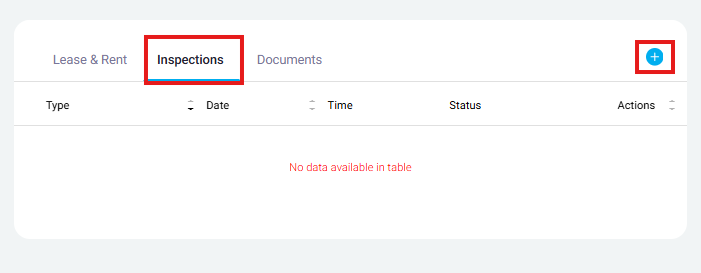
Visit the Tenancy Record > Click 'Inspections' near the middle of the screen > Click the '+' in the top right corner of the box (pictured below)
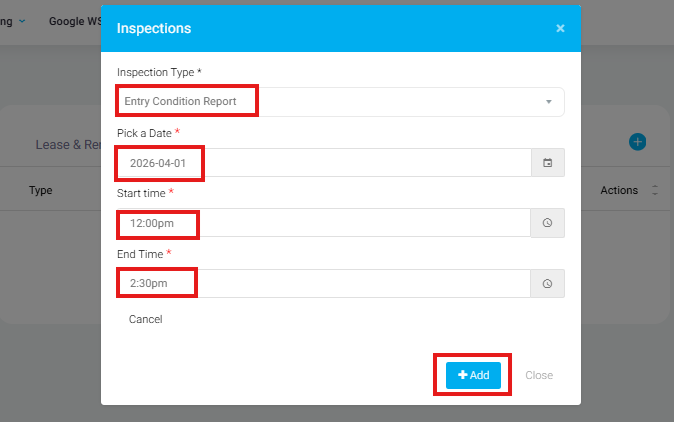
Once it opens the below pop up window, fill in the inspection information > Once complete, click 'Add'
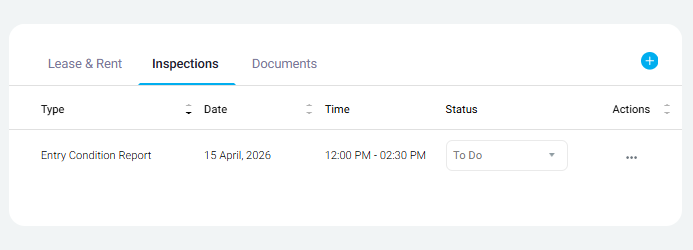
Once added, the inspection will now be visible in the Tenancy Record page. This will take up to 24 hours to become visible in your Inspection Manager. If you need to access the inspection sooner, please contact Head Office Rentals team via email or phone call.
Was this article helpful?
That’s Great!
Thank you for your feedback
Sorry! We couldn't be helpful
Thank you for your feedback
Feedback sent
We appreciate your effort and will try to fix the article